Per-rep verdicts
Not one score for the set — a clean or unclean flag on every single rep, and a “6/8 clean” ratio that gets harder to fake than a rep count.
CaliVision films a set, scores every rep out of 100, flags the ones that broke down, and replays them with the joint that gave out marked. It all runs on your phone — the video never leaves it.
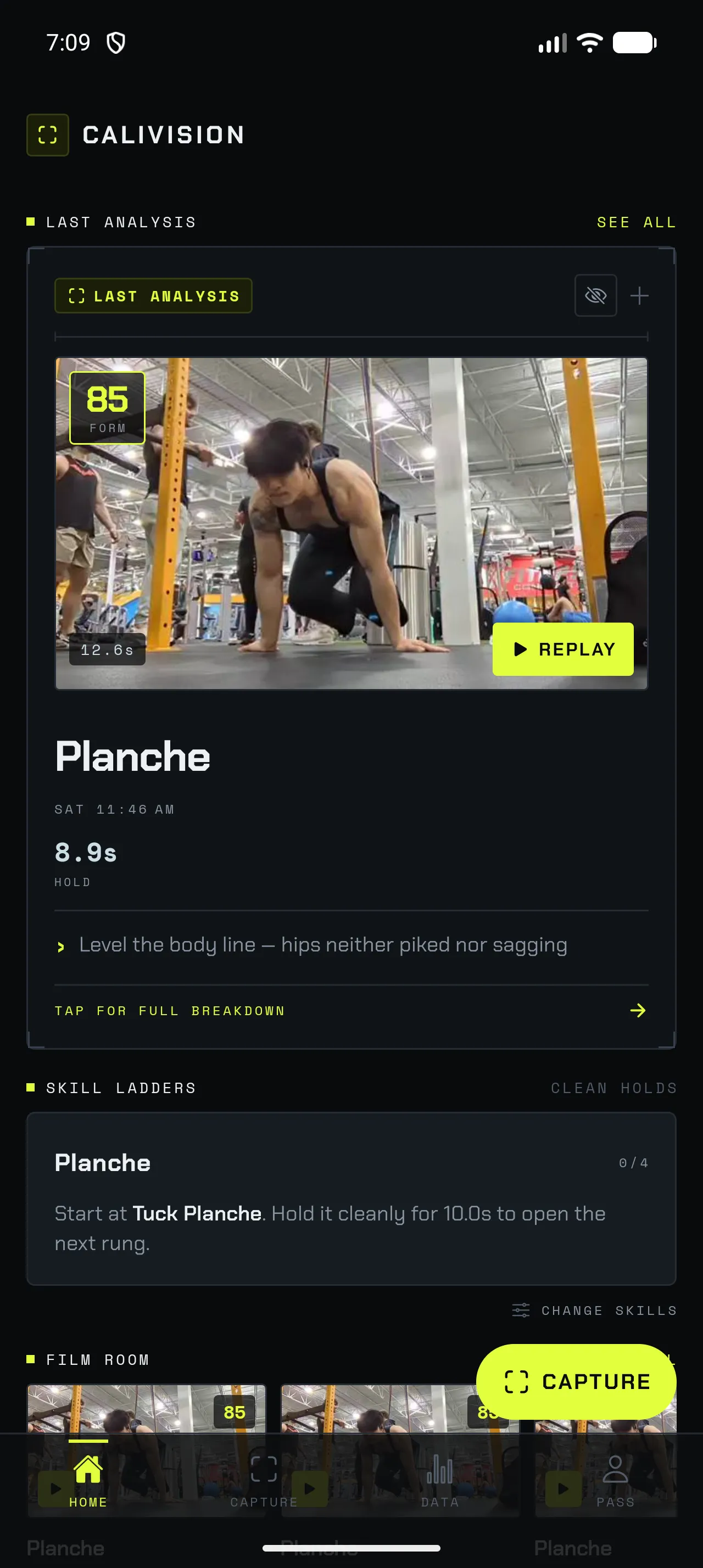
Calisthenics punishes small errors more than almost any other training. Three centimetres short of lockout, a hip that sags in the last two reps of a set, a front lever that turned into a tuck somewhere around second eight — none of it feels different from the inside, and all of it decides whether the next skill ever arrives.
A coach catches it in a glance. Most people training on a bar in a park don’t have one, so they film themselves, squint at the footage, and end up back where they started: fairly sure something was off, no idea which rep or which joint.
CaliVision is the second pair of eyes — measuring instead of guessing, on the phone already in your bag.
Record in the app or pick a clip you already have. Side-on, whole body in frame. Nothing uploads — the file stays in the app’s private storage.
A pose model runs on your phone and tracks 17 body keypoints per frame. Joint angles are smoothed, reps are counted by a two-threshold state machine that noise can’t double-count, and each rep gets a form score out of 100.
The replay marks the reps that failed and tells you which joint gave out — depth, body line or tempo — with the angle it measured. You fix a specific thing, not a vibe.
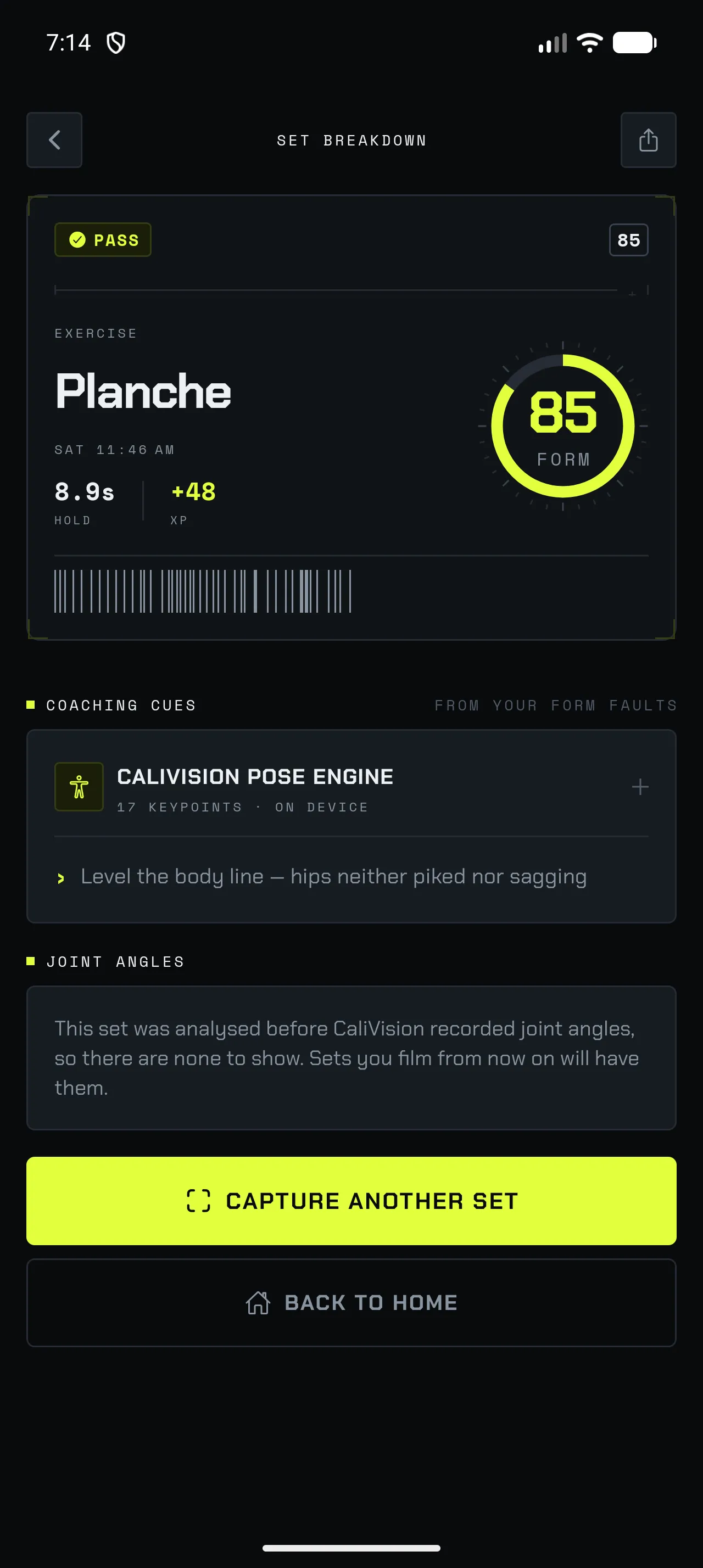
Every cue is attached to a fault the scorer actually measured. The engine label is not decoration — it names what ran and where, and when a set predates a measurement the app says so instead of inventing one.
No number in the app exists without footage behind it. A record, a progression percentage, a form score — each one is tappable straight to the replay that produced it. That traceability is the whole trust model.
Not one score for the set — a clean or unclean flag on every single rep, and a “6/8 clean” ratio that gets harder to fake than a rep count.
Step through your own footage with the bad reps marked in red. The evidence for every number is one tap away.
The angles measured on that set: the driving joint’s depth, torso deviation, hip and knee shape — with a status only where the scorer actually judged one.
A front lever isn’t a rep. Static skills are scored on time under tension and shape, with the clock stopping when the line breaks.
Pin up to three skills — planche, front lever, L-sit — and see the rung you’ve graded into, what unlocks the next one, and the clip that proves it.
A PR built from sloppy reps is a lie you tell yourself. The record board counts clean reps and longest clean holds, each linked to its proof clip.
A seven-day mean form score and a weekly chart where rest days are gaps rather than zeros — so a day off doesn’t look like a collapse.
The walk to the bar and back never reaches your storage. Saved clips start 2.5s before your first rep and end 2s after your last — cut losslessly, before anything is written.
Recording, analysis, scoring, replay and history all run with no connection. Not a degraded offline mode — the normal one.
Most fitness apps that analyse video ship it to a server, then write a privacy policy about it. CaliVision has no server, no account system and no analytics on your training. Turning “private mode” on isn’t possible, because there is no other mode.
Anyone who films their sets knows the problem. A year of pull-up clips is gigabytes of phone storage, and most of every clip is you walking to the bar, chalking up, and walking back to stop the recording.
CaliVision knows exactly when your first rep started and your last one ended, because it just counted them. So it keeps that window — plus a 2.5-second lead-in and a 2-second tail so the cut never feels abrupt — and drops the rest before the clip is ever saved. You keep the evidence and none of the dead air.
Flared elbows, sagging hips, half reps, a craned neck and rushed tempo — the five push-up form mistakes that cap your progress, and how to check for each one.
Read the guide →Form guide · Pull-upA repeatable way to audit your own pull-ups on video: what to film, the four checkpoints that matter, and how to tell a real rep from one that only looked finished.
Read the guide →Skill guide · Front leverThe four front lever progressions, what a clean hold at each one actually looks like, why most people stall at advanced tuck, and how to measure a hold you cannot see.
Read the guide →No. Pose detection and form scoring both run on your phone, and clips are stored in the app’s private directory. There is no account, no sync and no server that receives your footage. If you want a clip somewhere else, you share it deliberately through the system share sheet.
No account is required to use the app — it works offline the first time you open it. Pricing for anything beyond the free tier is not finalised, and we would rather say that than invent a number on a landing page.
No, and it matters. Pose detection uses a small vision model (MoveNet Lightning) on-device, but the scoring itself is explicit, readable rules: how deep the rep went, whether the body line held, whether the tempo was rushed. Every point deducted maps to a measurement you can check, rather than a sentence a chatbot produced.
Push-ups, pull-ups, squats, muscle-ups and handstand push-ups are counted as reps. Planche, front lever, L-sit and handstand are judged as holds — scored on time under tension and shape rather than a rep tally.
An Android phone on 8.0 or newer, with a working camera. Inference runs on the device’s GPU or CPU depending on what is available. iOS is planned; Android ships first because that is where the build is furthest along.
Film side-on, get your whole body in frame including hands and feet, and train somewhere with reasonable light. The analysis is only as good as the keypoints it can see — a cropped or backlit clip produces a cautious score, not a confident one.
Less than you would expect, because the saved clip is not the whole recording. CaliVision already knows when your first rep started and your last one ended, so it keeps that window plus a 2.5-second lead-in and a 2-second tail, and discards the walk to the bar and back before the file is written. The cut copies the original video samples rather than re-encoding them, so there is no quality loss and it takes under a second. Clips you upload from your gallery are trimmed the same way, and a storage panel in the app shows exactly how many megabytes your clips are using and lets you delete any of them.
Yes. Everything the app does after install — recording, analysis, scoring, replay, your history — works with the phone in airplane mode. That is a consequence of running on-device, not a separate feature.
Filming gives you footage; you still have to know what to look for and scrub for the moment it went wrong. CaliVision marks which specific reps broke down, tells you which joint gave out and by how much, and jumps you straight to those frames.
An Android closed test comes first, then the public Play Store release. The waitlist gets one email when the test opens and one at launch — nothing else.
Android first. One email when the test opens, one when it hits the Play Store, and nothing in between. Leave any time in a click.